Showing posts with label OracleAdf. Show all posts

Monday, 14 January 2019

Groovy Examples in ADF (column sum using Groovy)

Hello everyone
In this post i'll show you how we can add total of a column in table using Groovy

To show total we need
1- create transient attribute in employees view object and set Type BigDecimal
2-write the following groovy in expression
object.getRowSet().sum('Salary')


3-create a .jsf page and drag and drop employees view object on .jsf page as table
To show footer you need to do the following steps

from structure window right click on salary column go to Facets-Column and select Footer from small window


4-create attribute value
to create attribute value we need to go page bindings
click on green plus button
from insert Item window select AttributeValues and click ok


5-create attribute binding
when we click on OK a new window will appear name as create attribute Binding
select data source and attribute according to following image and click ok


6- finally we need to assign footer value
go back to page Design tab
from component palette  drag and drop output text on footer
select output text and write expression according to image


Please Feel Free To Ask if you Face any Difficulty 
Like and share to help others
Thanks

Date 15-01-2019

Saturday, 12 January 2019

Groovy Examples in ADF (count and sum examples using groovy)

Hello everyone
In this post i will show you how to perform count and sum using groovy


Note:- For this post i am using Department and Employees tables of HR Schema (oracle database 11g)

Examples
1-count employees department wise (adf.object.EmployeesView.count("EmployeeId"))
2-department wise employees salary sum (adf.object.EmployeesView.sum("Salary"))


1-count employees department wise
    As we know there is relationship  between Departments and Employees table (DepartmentID refer in Employees Table)
this relation in ADF is known as View Link 
so by using this view link we can access EmployeesViewObjecs attributes in DepartmentViewObject
we just need accessor name to access attributes
to get accessor name we need to perform the following setps

1-open view link definition file
2-click on Edit accessors
3- copy the employees view object accessor name


4-go to Departments view object and create a new transient attribute
5-and append  adf.object (it means the current object ) before accessor name and .count  (count is the mehtod name) after accessor name
following is the complete groovy
     adf.object.EmployeesView.count("EmployeeId")


2-department wise employees salary sum
    Secondly if you want department wise salary sum
   you need to perform the following steps
   1-perform first 3 steps that describe above
   2-create transient attribute in Department view object and set Type BigDecimal
   2- write the following groovy in Expression of transient attribute

    adf.object.EmployeesView.sum("Salary")


Please Feel Free To Ask if you Face any Difficulty 
Like and share to help others
Thanks
Date 12-01-2019

Groovy Examples in ADF (current date , current date and time)

Hello everyone
today i will show you some Groovy Examples


Note:- For this post i am using Department and Employees tables of HR Schema (oracle database 11g)
         
Examples
1- to get current date   (adf.currentDate)
2- to get current date and time   (adf.currentDateTime)


1- to get current date
    to get current date using groovy you need to perform the following steps
    i) create a transient attribute with Date datatype in Departments view object.
    ii) write the following groovy in Expression  (adf.currentDate)


1- to get current date and time 
    to get current date and time using groovy you need to perform the following steps
    i) create a transient attribute with Date datatype in Departments view object.
    ii) write the following groovy in Expression  (adf.currentDateTime)    


Please Feel Free To Ask if you Face any Difficulty 
Like and share to help others
Thanks
Date 12-01-2019


Invoke Database Procedure and Function in ADF

Hello everyone
In this post we will learn how to invoke database Procedure and Function from ADF Application

Steps we need to perform
1-Create procedure in database
2-Create method in AppModuleImpl to invoke procedure
3- Run AppModule to test


1-Create procedure in database
        First we need to create procedure in database
        i have created the following procedure in HR Schema


2-Create method in AppModuleImpl to invoke procedure

    Second we need to write a method in AppModuleImpl class to invoke the DB Procedure for that we need
1-go to AppModuleImple class and create method


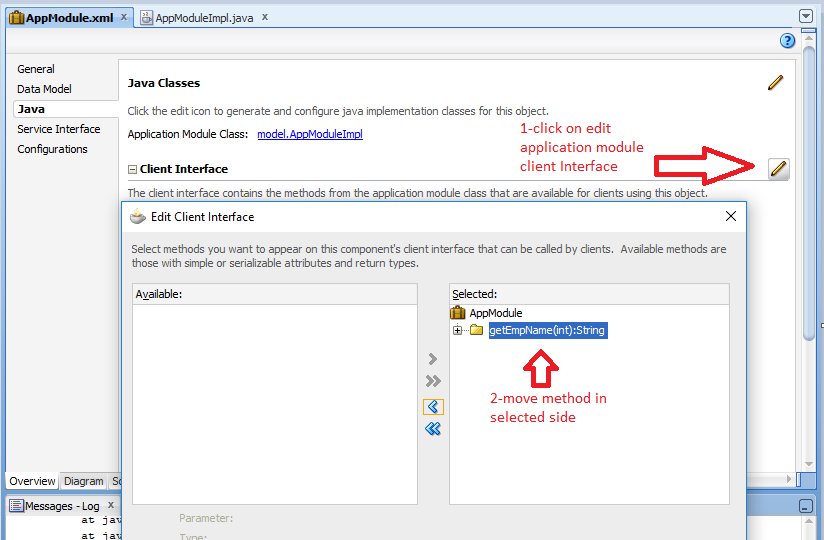
2- add method to application module client interface


3- Run AppModule to test
       just run your AppModule
       1- Double click on AppModule
       2- Pass parameter value
       3- and click on Execute


Please Feel Free To Ask if you Face any Difficulty 
Like and share to help others
Thanks
Date 12-01-2019


Query to get Business unit (ORGANIZATION_ID) Detail in oracle Fusion

  SELECT HAO.ORGANIZATION_ID AS BUSINESS_UNIT_ID,         HAOT.NAME,         HAO.BUSINESS_GROUP_ID,         HAO.EFFECTIVE_START_DATE,       ...