Thursday, 26 May 2022

Query to get Business unit (ORGANIZATION_ID) Detail in oracle Fusion

  SELECT HAO.ORGANIZATION_ID AS BUSINESS_UNIT_ID, 

       HAOT.NAME, 

       HAO.BUSINESS_GROUP_ID, 

       HAO.EFFECTIVE_START_DATE, 

       HAO.EFFECTIVE_END_DATE 

  FROM HR_ALL_ORGANIZATION_UNITS_F HAO, HR_ORGANIZATION_UNITS_F_TL HAOT 

 WHERE HAO.ORGANIZATION_ID = HAOT.ORGANIZATION_ID 

   AND HAO.EFFECTIVE_START_DATE = HAOT.EFFECTIVE_START_DATE 

   AND HAO.EFFECTIVE_END_DATE = HAOT.EFFECTIVE_END_DATE 

   AND TRUNC(SYSDATE) BETWEEN HAO.EFFECTIVE_START_DATE AND 

       HAO.EFFECTIVE_END_DATE 

   AND HAOT.LANGUAGE = 'US' 

 ORDER BY HAOT.NAME

Currency code and Currency detail in oracle Fusion

select a.enterprise_id, a.currency_code, a.CURRENCY_CODE || '-' || b.NAME

  from FND_CURRENCIES_B a, FND_CURRENCIES_TL b

 where a.enterprise_id = b.enterprise_id

   and a.currency_code = b.currency_code

   and a.enabled_flag = 'Y'

   and a.currency_flag = 'Y'

   and a.iso_flag = 'Y'

   and b.language = 'US'

Wednesday, 15 December 2021

How to resolve error "This installer must be executed using a Java Development Kit (JDK) "but your jdk path" is not a valid JDK." while installing weblogic server

 Hi

Sometimes we face "not a valid jdk" error while installing weblogic server 


to resolve the above error use the following command and wait some time installation process will start shortly 

"C:\Program Files\Java\jdk1.8.0_311\bin\javaw.exe" -jar F:\Software\servers\weblogic\fmw_12.1.3.0.0_wls.jar


Wednesday, 1 December 2021

Query to get cash receipts information in oracle fusion

 /* Formatted on 12/2/2021 11:37:58 AM (QP5 v5.294) */

SELECT *

  FROM ar_cash_receipts_all

 WHERE     receipt_number = '1'

       AND NVL (TRUNC (RECEIPT_DATE), SYSDATE) =

              TO_DATE ('28-11-21', 'DD-MM-YY')

Thursday, 25 November 2021

Query to get PO tax amount against po header id (zx_lines join with po) in oracle fusion

 SELECT 

       sum(((nvl(zl.taxable_amt,0) *nvl(zl.tax_rate,0))/100) )tax_amount

  FROM zx_lines              zl,

       po_line_locations_all pll,

       po_lines_all          pl,

       po_headers_all        ph

 WHERE     zl.trx_id = pll.po_header_id

       AND zl.trx_line_id = pll.line_location_id

       AND zl.entity_code = 'PURCHASE_ORDER'

       AND pl.po_header_id = pll.po_header_id

       AND pl.po_line_id = pll.po_line_id

       AND pl.po_header_id = ph.po_header_id

       AND ph.po_header_id = 300000003243945 --po_headers_all.po_header_id

       order by pl.po_line_id

Tuesday, 23 November 2021

Query to get PO total amount in oracle fusion

 /* Formatted on 11/24/2021 11:03:32 AM (QP5 v5.294) */

SELECT SUM (NVL ( (spl.unit_price * spl.quantity), 0)) po_total_amount

   FROM po_headers_all sph, po_lines_all spl

  WHERE     sph.po_header_id = spl.po_header_id

        AND sph.type_lookup_code = 'STANDARD'

        AND sph.po_header_id = po_headers_all.po_header_id

Query to Get Requisition creator name and Po creator name in oracle fusion

 1-To get requisition creator name 

 SELECT spn.display_name  req_creator_name

          FROM per_person_names_f_v spn

         WHERE     POR_REQUISITION_HEADERS_ALL.preparer_id = spn.PERSON_ID(+)

               AND TRUNC (SYSDATE) BETWEEN spn.EFFECTIVE_START_DATE(+)

                                       AND spn.EFFECTIVE_END_DATE(+)


2- To get PO creator name 

SELECT spn.display_name po_creator_name

  FROM per_person_names_f_v spn

 WHERE     po_headers_all.AGENT_ID = spn.PERSON_ID(+)

       AND TRUNC (SYSDATE) BETWEEN spn.EFFECTIVE_START_DATE(+)

                               AND spn.EFFECTIVE_END_DATE(+)


Sunday, 21 November 2021

PO, CMR and XLA joins in oracle fusion

 SELECT a.po_line_id,

       a.PO_HEADER_ID,

       a.PO_NUMBER,

       a.VENDOR_ID,

       a.VENDOR_SITE_ID,

       a.PO_LINE_LOCATION_ID

  FROM cmr_purchase_order_dtls a, cmr_rcv_events b, poz_suppliers_v c

 WHERE b.cmr_po_distribution_id = a.cmr_po_distribution_id

   AND a.vendor_id = c.vendor_id

   AND a.active_flag = 'Y'

   AND b.accounting_event_id = xla_transaction_entities.source_id_int_1

RCV ,CMR and XLA joins in oracle fusion

 SELECT RSH.COMMENTS

  FROM cmr_purchase_order_dtls cpod,

       cmr_rcv_events          cre,

       CMR_TRANSACTIONS        CT,

       RCV_TRANSACTIONS        RT,

       RCV_SHIPMENT_HEADERS    RSH,

       poz_suppliers_v         ps

 WHERE     cre.cmr_po_distribution_id = cpod.cmr_po_distribution_id

       AND cpod.vendor_id = ps.vendor_id

       AND cpod.active_flag = 'Y'

       AND CRE.TRANSACTION_ID = CT.TRANSACTION_ID

       AND CT.RCV_TRANSACTION_ID = RT.TRANSACTION_ID

       AND RT.SHIPMENT_HEADER_ID = RSH.SHIPMENT_HEADER_ID

       AND RSH.RECEIPT_NUM = CT.RECEIPT_NUMBER

       AND cre.accounting_event_id = xla_transaction_entities.source_id_int_1

Wednesday, 16 January 2019

Programmatically Inseration in Oracle ADF

Hello everyone
in this post we will learn how we can insert data programmatically

for this example i am using jdeveloper 11.1.2.3.0 and Departments table of HR schema

Steps
1- Create a new application and connect it with oracle HR Schema
2-Create Department and Location view objects and make sure these  objects are Entity base because only Entity base view objects are update able.
3-Create a .jsf page
4-Drag and drop two input texts and a button on .jsf page from component palette
5-Drag and drop LocationView1 on .jsf page as selectOneChoice
6-Dreate a bean and create bindings of input texts and button with bean


in the bean method you need two things
a- Iterators ID and
b-  Row Impl Classes

so for Iterators id  you need to do the following
we need access two iterators in bean
a) DepartmentView Iterator (to insert new row )
b)and LocationView Iterator (to get selected location id )


to access Iterator in bean we need iterator ID and in order to get Iterator ID we need to go
page bindings select the iterator and copy id from property Inspector


and secondly we need Row Impl to access getters and setters

   //4-get current row of location view iterator
       LocationsViewRowImpl locCRow = (LocationsViewRowImpl)locIter.getCurrentRow();
     
   //6-create new row in department view object
        DepartmentsViewRowImpl nrow = (DepartmentsViewRowImpl)vo.createRow();

So to generate RowImpl classes open view object and click on java tab and then click on Edit java option


here is the complete code that we use to insert new department


public class DepartmentInseration {

    private String deptID;
    private String deptName;


    public DepartmentInseration() {
    }

    public String insertNewDepartn() {
        // 1- get bindings
        BindingContainer container=BindingContext.getCurrent().getCurrentBindingsEntry();
        //2-get department view iterator
        DCIteratorBinding deptIter = (DCIteratorBinding)container.get("DepartmentsView1Iterator");
        //3- get location view iterator to get selected location id
        DCIteratorBinding locIter = (DCIteratorBinding)container.get("LocationsView1Iterator");
        //4-get current row of location view iterator
       LocationsViewRowImpl locCRow = (LocationsViewRowImpl)locIter.getCurrentRow();
     
        //5-get department view object from deptIter
        ViewObject vo=deptIter.getViewObject();
        //6-create new row in department view object
        DepartmentsViewRowImpl nrow = (DepartmentsViewRowImpl)vo.createRow();
        //7-set values
        nrow.setDepartmentId(Integer.valueOf(this.getDeptID()));
        nrow.setDepartmentName(this.getDeptName());
        //8-get location id from loaction view current row
        nrow.setLocationId(locCRow.getLocationId());
        vo.insertRow(nrow);
     
        deptIter.getDataControl().commitTransaction();
        //to show popup
        FacesContext context = FacesContext.getCurrentInstance();
        context.addMessage(null, new FacesMessage("Data saved...."));
     
        return null;
    }

    public void setDeptID(String deptID) {
        this.deptID = deptID;
    }

    public String getDeptID() {
        return deptID;
    }

    public void setDeptName(String deptName) {
        this.deptName = deptName;
    }

    public String getDeptName() {
        return deptName;
    }

    public void setLocatonID(String locatonID) {
        this.locatonID = locatonID;
    }

    public String getLocatonID() {
        return locatonID;
    }
}


Please Feel Free To Ask if you Face any Difficulty 
Like and share to help others
Thanks


Date 17-01-2019

Monday, 14 January 2019

Groovy Examples in ADF (column sum using Groovy)

Hello everyone
In this post i'll show you how we can add total of a column in table using Groovy

To show total we need
1- create transient attribute in employees view object and set Type BigDecimal
2-write the following groovy in expression
object.getRowSet().sum('Salary')


3-create a .jsf page and drag and drop employees view object on .jsf page as table
To show footer you need to do the following steps

from structure window right click on salary column go to Facets-Column and select Footer from small window


4-create attribute value
to create attribute value we need to go page bindings
click on green plus button
from insert Item window select AttributeValues and click ok


5-create attribute binding
when we click on OK a new window will appear name as create attribute Binding
select data source and attribute according to following image and click ok


6- finally we need to assign footer value
go back to page Design tab
from component palette  drag and drop output text on footer
select output text and write expression according to image


Please Feel Free To Ask if you Face any Difficulty 
Like and share to help others
Thanks

Date 15-01-2019

Saturday, 12 January 2019

Groovy Examples in ADF (count and sum examples using groovy)

Hello everyone
In this post i will show you how to perform count and sum using groovy


Note:- For this post i am using Department and Employees tables of HR Schema (oracle database 11g)

Examples
1-count employees department wise (adf.object.EmployeesView.count("EmployeeId"))
2-department wise employees salary sum (adf.object.EmployeesView.sum("Salary"))


1-count employees department wise
    As we know there is relationship  between Departments and Employees table (DepartmentID refer in Employees Table)
this relation in ADF is known as View Link 
so by using this view link we can access EmployeesViewObjecs attributes in DepartmentViewObject
we just need accessor name to access attributes
to get accessor name we need to perform the following setps

1-open view link definition file
2-click on Edit accessors
3- copy the employees view object accessor name


4-go to Departments view object and create a new transient attribute
5-and append  adf.object (it means the current object ) before accessor name and .count  (count is the mehtod name) after accessor name
following is the complete groovy
     adf.object.EmployeesView.count("EmployeeId")


2-department wise employees salary sum
    Secondly if you want department wise salary sum
   you need to perform the following steps
   1-perform first 3 steps that describe above
   2-create transient attribute in Department view object and set Type BigDecimal
   2- write the following groovy in Expression of transient attribute

    adf.object.EmployeesView.sum("Salary")


Please Feel Free To Ask if you Face any Difficulty 
Like and share to help others
Thanks
Date 12-01-2019
Groovy Examples in ADF (current date , current date and time)

Hello everyone
today i will show you some Groovy Examples


Note:- For this post i am using Department and Employees tables of HR Schema (oracle database 11g)
         
Examples
1- to get current date   (adf.currentDate)
2- to get current date and time   (adf.currentDateTime)


1- to get current date
    to get current date using groovy you need to perform the following steps
    i) create a transient attribute with Date datatype in Departments view object.
    ii) write the following groovy in Expression  (adf.currentDate)


1- to get current date and time 
    to get current date and time using groovy you need to perform the following steps
    i) create a transient attribute with Date datatype in Departments view object.
    ii) write the following groovy in Expression  (adf.currentDateTime)    


Please Feel Free To Ask if you Face any Difficulty 
Like and share to help others
Thanks
Date 12-01-2019


Invoke Database Procedure and Function in ADF

Hello everyone
In this post we will learn how to invoke database Procedure and Function from ADF Application

Steps we need to perform
1-Create procedure in database
2-Create method in AppModuleImpl to invoke procedure
3- Run AppModule to test


1-Create procedure in database
        First we need to create procedure in database
        i have created the following procedure in HR Schema


2-Create method in AppModuleImpl to invoke procedure

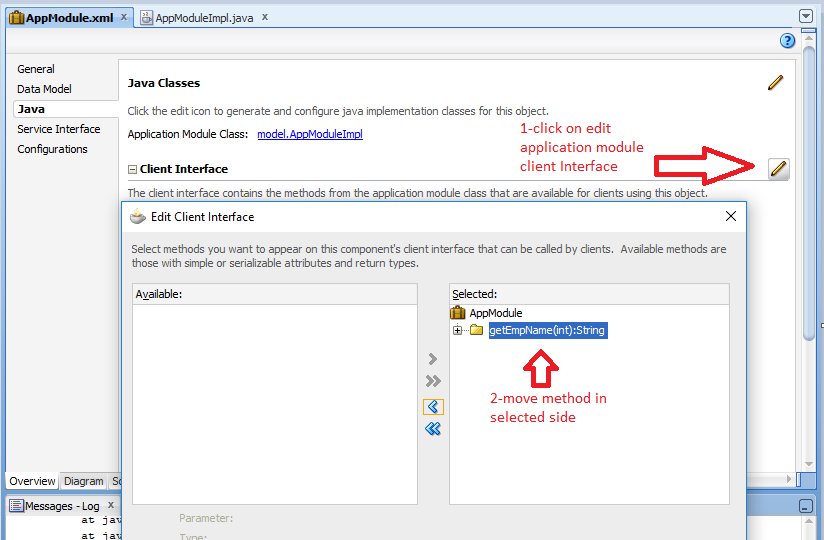
    Second we need to write a method in AppModuleImpl class to invoke the DB Procedure for that we need
1-go to AppModuleImple class and create method


2- add method to application module client interface


3- Run AppModule to test
       just run your AppModule
       1- Double click on AppModule
       2- Pass parameter value
       3- and click on Execute


Please Feel Free To Ask if you Face any Difficulty 
Like and share to help others
Thanks
Date 12-01-2019


Tuesday, 20 March 2018

Set Default Value of selectOneChoice from Bean in ADF 12c

Hello everyone in this post you will see

1  -  Create selectOneChoice manually
2  -  Set default value of selectOneChoice from bean
3  -  Get selected value in bean

for this post i am using jdeveloper 12.2.1.2.0

Lets start

1  -  Create selectOneChoice manually

Steps  1 -  Create new application
Steps  2 -  Create connection
Steps  3 -  Create Department view Object and then a jsf page

Steps  3 -  Click on the source tab of jsf page and then you need to create the af:selectOneChoice manually


Steps  4 -  Select  af:selectOneChoice and drop a af:forEach component on it
Steps  5 -  Then drop f:selectItem on af:forEach


Steps  6 -  Go to the Bindings tab of your jsf page and create a Tree Binding of Department vo


Steps  6 - Select af:forEach then go to properties pallet select Items value form binding and create a variable d


Steps  7 - Select f:selectItem from structure window and go to properties pallet and set the value of
item Label and item Value like following


Now Run your page


2  -  Set default value of selectOneChoice from bean

To set default value of selectOneChoice

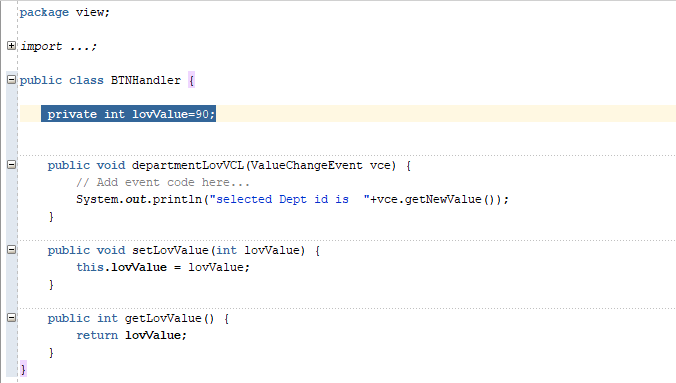
Steps  1 -  Create value binding of selectOneChoice with bean and initialize the property in bean with the department id that you want to set as a default value


Now Run your jsf page you will see the Department Name againt Department id 90


3  -  Get selected value in bean

To get the selected Department Id in bean

Steps  1 -  Create valueChangeListener binding of selectOneChoice with bean
Steps  2 -  set autoSubmit =true of selectOneChoice


Run your page change the value of selectOneChoice


Saturday, 11 February 2017

Dynamic Menus in ADF

Hi everyone this tutorial is about, how we can create menus dynamically in ADF

For this post i am using jdeveloper 11.1.2.3.0

1 ) First you need to create a table in database and insert data


2) Create two Query Base VO in ADF Application
after that create view link between Main_menu VO and Sub_menu VO
For creating view link select MId from Main_menu and select ParentId from Sub_menu


3 ) Then create a Home.jsf page and then drag and drop Menu bar on it from components then af:iterator drop on Menu bar , then  drop Menu on  the iterator then again drop af:iterator on Menu and then MenuItem on the second af:iterator , the structure of the jsf page shows in the next pic , try to create the same jsf page like the following structure


4 ) Now go to the Bindings of jsf page
click on green + icon of Bindings part ..
From the InsertItem window select tree and hit ok


After clicking the ok a new window will appear name as "Create Tree Binding"
click on Add button


Then from the "Add Data Source " window select Main_menu1 and click ok

Then click on the green + icon and click on AddRule


Then Select MId and MName as Display as Display Attributes

Again Click on green + icon and then click on AddRule and select select sub_menu, and select all the attributes as Display Attributes


After adding tree item your jsf page Bindings will be looks like this


Now go to Structure window select first af:iterator and set its value
to set the iterator value
clikc on Expression Builder of Value attribute , then open Bindings , then open Main_menu1 and select collectionModel


then set the value 'M' of var attribute  (properties of first iterator)


Then select the af:menu from Structure window and set Text property with the following value

#{M.MName}


until now if you Run your Home.jsf page , the Main Menu will print on screen

To set the value of second iterator , first we need to get the accessor name of Sub_menu
to get the accessor name open the view link 'Main_sub_VL' that we have created between Main_menu and Sub_menu , click on Relationship tab , click on Edit accessor and copy the name of the accessor


and write the following expression in the value property of second af:iterator
also write 'S' for var property


Select the af:commandMenuItem from the Structure window and write the following expression int 'Text' property  #{S.MName}


Now Run your Home.jsf page and see the Results , it will be


Second Part

Now to get the path of jsff or jsf pages by clicking on Menu item

Select the af:commandMenuItem from structure window and  drop a attribute from component palette on it.

write the name of attribute 'P'
and write the following expression in value  #{S.MPath}


Then select af:commandMenuItem from structure window and create a ActionListener binding with a request scope been (in this example the been name is MenuBeen)


Edit your data base table and save the path in M_Path attribute , for this example i just saving a string


Open your MenuBeen and write the following code


Run your Home.jsf page click on SALE RTN menu and see the result on console


Thanks

Query to get Business unit (ORGANIZATION_ID) Detail in oracle Fusion

  SELECT HAO.ORGANIZATION_ID AS BUSINESS_UNIT_ID,         HAOT.NAME,         HAO.BUSINESS_GROUP_ID,         HAO.EFFECTIVE_START_DATE,       ...